In today’s digital age, live streaming has become a powerful and cost-effective way to reach a large global audience. Whether you’re commemorating a milestone, hosting a corporate event, or simply sharing a special moment, live streaming offers a great opportunity to connect with people worldwide. With platforms like Facebook, YouTube, and LinkedIn offering free streaming services, getting started has never been easier.
Define Your Event & Streaming Goals
Before thinking about cameras or platforms, it’s essential to define why you’re live-streaming in the first place. Clear goals will guide every technical and creative decision that follows.
Ask yourself:
- Is the goal to inform, educate, celebrate, or promote?
- Are you streaming live only, or do you want to repurpose the footage later?
- Is audience interaction important, or is it primarily a one‑way broadcast?
Having clarity at this stage helps avoid over‑ or under‑producing your event.
Clarify the Event Type & Content Format
Different events require different approaches. A shareholder meeting, for example, will have very different needs compared to a graduation ceremony or product launch.
Consider:
- The length of the event
- Whether there will be speakers, panels, performances, or audience interaction
- If graphics, slides, or pre‑recorded video will be included
Match Production Complexity to Goals
Not every event requires a full broadcast‑level setup. Some events can be streamed effectively with a single camera and microphone, while others benefit from multi‑camera switching, professional audio mixing, and branded graphics.
Matching production complexity to your goals helps you:
- Stay within budget
- Reduce technical risk
- Deliver a polished experience that aligns with audience expectations
This is where working with an experienced live event production partner can make a significant difference.
Benefits of Live Streaming Events
Live streaming isn’t just convenient — it delivers measurable value for both hosts and audiences. Some of the biggest benefits include:
- Real‑time engagement with a wider, often global audience
- Cost savings compared to in‑person venues, travel, and staffing
- Immediate feedback through polls, chat, and live Q&A
- Increased accessibility for those with travel, mobility, or time constraints
- Expanded brand visibility through replays, shares, and social reach
These benefits make live streaming a compelling choice for everything from corporate updates to community celebrations.
Essential Live Streaming Equipment
To ensure a successful live stream, there are a few core components you’ll need. These form the foundation of any professional broadcast.
1. Camera
A stable, high‑quality camera is the backbone of your live stream. Look for one that allows manual control over image settings such as exposure and brightness, and can connect directly to an encoder. Using a tripod or mounting system is essential for steady footage.
2. Audio
Clear audio is just as important as video, if not more so. Use dedicated microphones for presenters or performers, routed through a mixer for proper sound control. Avoid relying solely on built‑in camera microphones, as they tend to capture background noise and reduce clarity.
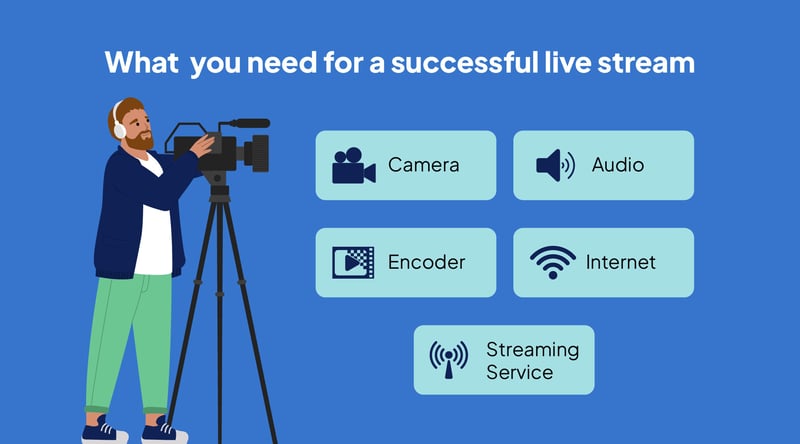
3. Encoder
The encoder acts as the bridge between your cameras, audio equipment, and the streaming platform. It converts your video signal into a format suitable for live broadcast. Encoders can be hardware‑based or software‑based, depending on the scale of the event.
4. Internet
A reliable internet connection is critical. A hard‑wired Ethernet connection is always recommended over Wi‑Fi. Test your upload speeds in advance to ensure your connection can handle the required bandwidth without interruption.
Choosing the Right Live Streaming Platform
Not all streaming platforms are created equal — your choice should reflect your audience and event goals.
Zoom / Microsoft Teams
- Zoom Webinar has built-in registration and is great for public and private events. Zoom and Teams offer enterprise security for corporate events that require controlled access.
YouTube Live / Facebook Live / LinkedIn Live
- Excellent for public or brand‑focused events with built‑in audiences and native sharing
Vimeo, StreamShark, IBM Video Streaming
- Premium platforms offering advanced features like white‑label branding, multi‑bitrate streaming, analytics, and enterprise‑level controls
Consider which features matter most: privacy settings, chat moderation, user experience, or social reach — then choose a platform that aligns with both your technical needs and target viewers.
Streaming Service
Choose a platform that fits your audience and goals. Facebook, YouTube, and LinkedIn are excellent entry‑level options, offering built‑in audiences and ease of access. For more advanced features, privacy controls, or higher production value, platforms such as Vimeo, Dacast, or StreamShark may be more suitable, especially when custom branding, analytics, or multi‑bitrate streaming is needed.
For corporate events with strict security requirements, we also offer seamless streaming to platforms like Zoom, Microsoft Teams, and IBM Video Streaming, ensuring a private, invitation‑only experience with password protection, end‑to‑end encryption, and organization‑level access controls.
Budgeting for Your Live Stream
Smart budgeting means knowing where to spend and where to save:
- Prioritize audio quality, internet reliability, and camera clarity — these impact the viewer experience most
- Use software‑based encoders for smaller events to reduce equipment costs
- Rent specialized gear instead of purchasing for one‑time events
- Keep it simple — one well‑planned camera is better than three poorly executed ones
HB Live works with clients to scale production to their budget — without sacrificing quality.
Prepare & Test Your Set‑Up
Preparation is one of the most overlooked steps in live streaming. Always schedule time to test your full setup before going live.
This includes:
- Checking audio levels and microphone placement
- Testing camera framing and lighting
- Running a private or unlisted test stream
- Confirming stream stability on your chosen platform
Testing reduces stress on the day and allows issues to be resolved before your audience is watching.
Key Roles During Live Streaming for Events
Even small live streams benefit from clearly defined roles. Depending on the scale of your event, this may include:
- A camera operator
- An audio technician
- A streaming or technical director
- A moderator to manage comments or questions
Clear responsibilities help the production run smoothly and allow quick responses to any issues that arise.
Engaging Your Audience During the Stream
Great live streams aren’t just watched — they’re experienced:
- Use polls, Q&A, and chat to invite participation
- Assign a moderator to manage engagement and respond in real time
- Include shout‑outs, live giveaways, or viewer spotlights to build excitement
- Acknowledge viewers by name to make them feel seen and valued
Engagement drives retention — and helps transform passive viewers into active brand advocates.
Have a Contingency Plan
Live events are unpredictable, so it’s important to plan for the unexpected. A strong contingency plan can make the difference between a minor hiccup and a major disruption.
Consider having:
- Backup audio and video equipment
- Redundant internet options such as bonded cellular
- Spare cables, batteries, and power supplies
- A clear escalation plan if technical issues occur
- Being prepared ensures continuity and protects the viewer experience.
Live Streaming Mistakes to Avoid
Avoid these common pitfalls to ensure your stream runs smoothly:
- Skipping technical tests or run‑throughs
- Poor lighting or sound quality: Studio and on-site event spaces should use dedicated lighting and microphones. For remote contributors, ensure they’re not relying on built-in laptop mics or sitting in backlit rooms.
- Ignoring the live chat or audience cues
- Failing to prepare backup gear or internet options
- Overcomplicating production with too many moving parts
A clean, simple stream with clear sound and stable video always wins over a flashy but unreliable one.
Post‑Event Strategy: What to Do With Your Streamed Content
The live stream may be over, but the value of your content is just beginning. One of the biggest advantages of live streaming an event is the ability to reuse and repurpose the footage long after the broadcast ends.
A thoughtful post‑event strategy allows you to extend the lifespan of your content, reach new audiences, and maximise your return on investment.
Legal & Privacy Considerations for Live Streaming
Before you go live (or publish recordings), remember:
- Obtain consent from speakers and attendees if they may appear on camera
- Use properly licensed music to avoid copyright takedowns
- Comply with privacy laws when collecting viewer data or analytics
HB Live ensures every stream follows industry best practices — technically and legally.
Repurpose Content for Multiple Channels
Your recorded stream can be edited into a variety of formats, including:
- Highlight reels showcasing key moments or speakers
- Short clips for social media platforms such as LinkedIn, Instagram, or X
- Full‑length sessions for on‑demand viewing on your website or internal platforms
Breaking longer streams into digestible segments helps keep your content relevant and engaging across different audiences.
Improve Accessibility and Reach
Adding captions or subtitles to your videos makes them accessible to a wider audience, including those who have accessibility needs. Captioned content also performs better on social media and improves discoverability.
You may also consider providing downloadable resources or timestamps so viewers can easily navigate to the most relevant sections of the video.
Use Footage for Marketing and Promotion
Post‑event video is a powerful marketing asset. Clips from your live stream can be used to promote future events, support sales efforts, or reinforce brand credibility. Testimonials, audience reactions, and behind‑the‑scenes moments all help tell a compelling story beyond the live broadcast.
Archive for Long‑Term Value
For educational, corporate, or institutional events, archived video content can become a long‑term resource. Whether used for training, onboarding, or reference, professionally produced footage continues to deliver value well beyond the event day.
At HB Live, we help clients plan for post‑event content from the very beginning, ensuring that every live stream delivers lasting impact — not just a moment in time.
Conclusion: Roadmap to Flawless Live Streams
By ticking off these essentials, you’re well on your way to mastering the art of live streaming. Whether you’re broadcasting a graduation ceremony, a corporate conference, or a simple shareholder meeting, embracing live streaming opens up a world of possibilities to engage and connect with your audience.
So, start planning your next live stream with confidence, knowing that you have the tools and knowledge to make it a success.
Happy streaming!